How to Choose a Sit Stand Desk Frame: Adjustable Desk Legs Buying Guide
Building your own standing desk? Choosing the right sit stand desk frame is one of the most important decisions you'll make.
Whether you're upgrading an existing desk, creating a custom home office or building a workstation for multiple monitors, the frame determines how smoothly your desk moves, how much weight it supports and how stable it feels at standing height.
With so many desk legs, electric lifting systems and frame designs available, it's worth understanding what separates a basic frame from a reliable everyday workstation.
In this guide, we'll explain what to look for in adjustable desk frames, how to match a frame to your desktop and which features are worth paying for.
You can also explore JoyDesk's sit stand desk frames and adjustable desk legs to compare available options in Australia.
1. What Is a Sit Stand Desk Frame, and Why Choose One?
A sit stand desk frame is the adjustable base that supports your desktop and allows you to move between sitting and standing positions.
Unlike a complete standing desk, a frame-only solution generally includes the lifting legs, feet, support beams, motors or lifting mechanism, control system and necessary mounting hardware — but not the desktop itself.
This makes it a practical option if you:
-
Already own a desktop you'd like to reuse.
-
Want a custom timber, bamboo or laminate desktop.
-
Need a specific desktop size or finish.
-
Are upgrading a fixed-height workstation.
-
Want to replace an existing desk base without purchasing an entirely new desk.
For example, you might have a solid timber desktop that matches your home office perfectly. Instead of replacing it, you could install an electric desk frame underneath it, provided the desktop meets the frame manufacturer's size, weight and mounting requirements.
Buying tip: A frame-only setup isn't automatically cheaper than a complete standing desk. Compare the combined cost of the frame, desktop, installation and accessories before deciding.
2. Adjustable Desk Legs: Single Motor vs Dual Motor
One of the first decisions when choosing adjustable desk legs is whether to purchase a single-motor or dual-motor system.
Both can provide electric height adjustment, but their designs and performance can differ.
Single-motor desk legs
A single-motor system typically uses one motor to operate both lifting columns through a connecting mechanism.
These frames are often positioned as budget-friendly options for lighter workstations.
They may suit a basic laptop setup or occasional height adjustment, depending on the model.
However, lifting capacity, speed and mechanical design vary considerably between manufacturers.
Dual-motor adjustable desk legs
A dual-motor system generally places a motor in each lifting column.
Potential advantages include:
-
More balanced lifting across the frame.
-
Higher load capacity on many models.
-
Smooth adjustment with heavier equipment.
-
Better suitability for larger workstations.
Motor count alone doesn't guarantee stability or reliability. The quality of the lifting columns, frame structure and control system also matters.
For a home office with dual monitors, a monitor arm and other accessories, a well-designed dual-motor frame is often worth considering.
For example, JoyDesk's JOY Solid Standing Desk Frame and KING Pro Standing Desk Frame both use dual-motor lifting systems.
3. How to Choose a Desk Frame for Stability and Strength
Stability should be one of your highest priorities when purchasing a desk frame.
A frame might feel perfectly stable at sitting height but become less steady when fully extended.
This becomes especially important with larger monitors, heavy desktop materials or equipment mounted on adjustable arms.
Look at the lifting column design
Standing desk frames commonly feature two-stage or three-stage telescopic columns.
Two-stage columns use two extending sections and may offer a smaller overall height adjustment range.
Three-stage columns use three telescopic sections, often allowing a broader adjustment range.
However, the number of stages doesn't determine stability on its own. Column tolerances, frame geometry, materials and construction quality all influence how the desk performs.
Check the frame's structural design
When comparing desk frames, pay attention to:
-
Steel frame construction and connection points.
-
Foot length and shape.
-
Crossbeam support.
-
Desktop mounting positions.
-
Maximum supported desktop dimensions.
-
Stability at typical standing heights.
A wider or heavier desktop may require a more substantial frame.
Practical tip: If you use a monitor arm, check the frame's stability at standing height with the monitor positioned away from the centre. Monitor arms can increase leverage and make movement more noticeable.
4. Adjustable Table Legs: Getting the Right Height Range
One of the biggest mistakes when buying adjustable table legs is focusing only on the maximum height.
The minimum height matters just as much.
A desk that cannot lower sufficiently may force shorter users to raise their shoulders or position their keyboard too high while seated.
Likewise, a desk that cannot rise high enough may encourage taller users to lean forward.
How to measure your ideal desk height
Start by adjusting your chair so your feet are supported and your upper arms can relax near your sides.
With your elbows bent at approximately 90 degrees, measure the height at which your hands can comfortably reach the keyboard.
That gives you a useful starting point for seated desk height.
Repeat the process while standing.
Remember that your final working height depends on your individual proportions, keyboard thickness, footwear and working posture.
You can use the JoyDesk Standing Desk Height Calculator to estimate suitable sitting and standing heights before selecting a frame.
Compare actual height ranges
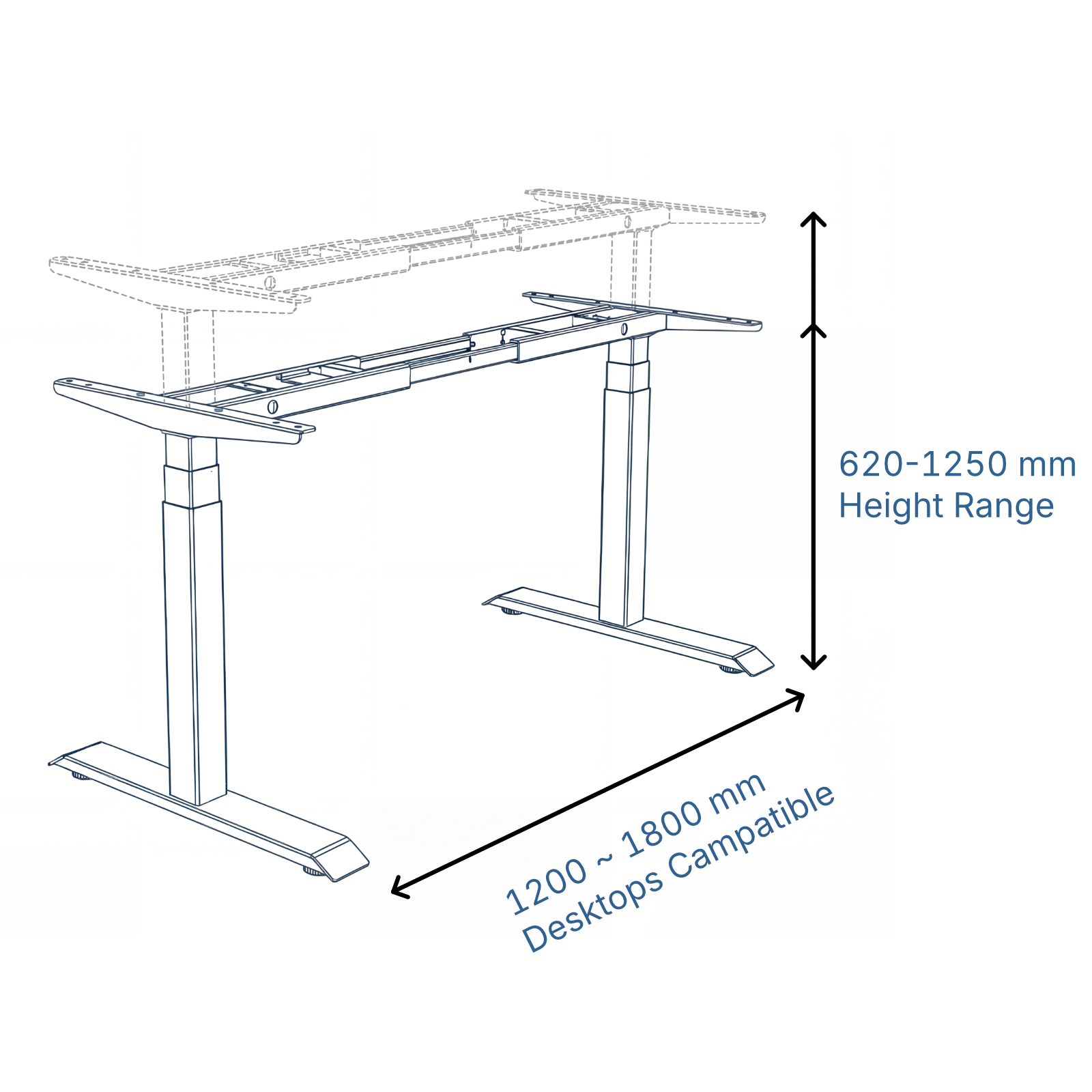
For reference, JoyDesk lists these frame adjustment ranges:
| Frame | Height adjustment range |
|---|---|
| JOY Solid | 620–1270 mm |
| KING Pro | 620–1250 mm |
These specifications are for the frame and should be considered alongside the thickness of your chosen desktop.
If your desktop is 25 mm thick, for example, its upper surface will sit approximately 25 mm above the frame's mounting height, subject to the manufacturer's measurement method.
Buying tip: Check both the minimum and maximum heights before ordering. A wider height range is useful, but only if it covers the positions you personally need.
5. How Much Weight Should Your Desk Legs Support?
The load capacity of your desk legs determines how much weight the lifting system is designed to handle.
It's easy to underestimate the combined weight of a workstation.
Consider a typical dual-monitor setup:
| Equipment | Example weight |
|---|---|
| Desktop | 25 kg |
| Two monitors | 12 kg |
| Monitor arm | 5 kg |
| Laptop and docking station | 4 kg |
| Keyboard, speakers and accessories | 6 kg |
| Estimated total | 52 kg |
These are illustrative weights. Your equipment and desktop may be considerably lighter or heavier.
The load rating needs to accommodate the desktop itself, not just the items placed on top.
A higher capacity may be useful if you have a solid timber desktop, several monitors or a heavier professional workstation.
JoyDesk frame load capacity comparison
-
JOY Solid: Up to 125 kg.
-
KING Pro: Up to 150 kg.
For many ordinary home office configurations, either capacity may be sufficient.
KING Pro provides additional rated capacity for heavier setups.
Remember that a higher weight rating doesn't automatically eliminate wobble, and it doesn't mean you should sit or stand on the desktop.
6. Will Your Existing Desktop Fit an Adjustable Desk Frame?
If you're purchasing a frame without a desktop, compatibility is essential.
Not all adjustable desk frames support every desktop size, material or shape.
Before buying, check three things.
Desktop width and depth
Measure your desktop accurately and compare it with the frame's supported dimensions.
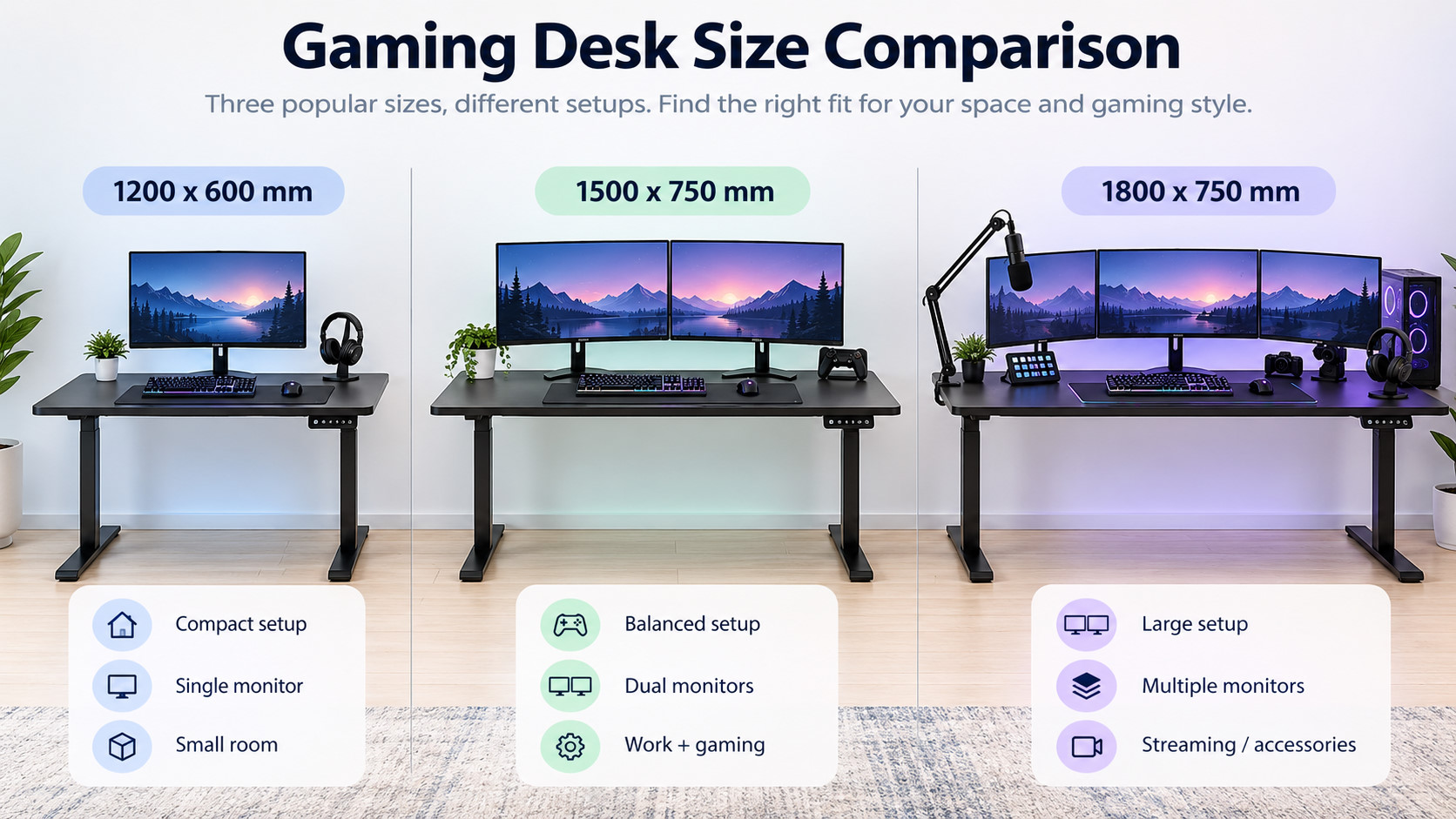
JoyDesk's current JOY Solid and KING Pro frame range supports desktop widths from 1200 mm to 1800 mm.
For a compact study, a 1200 mm desktop may provide sufficient room for a laptop and monitor.
A 1500 mm desktop can be a practical middle ground for everyday office work.
An 1800 mm desktop provides additional space for dual monitors, creative equipment and larger gaming setups.
Desktop material and thickness
Common desktop materials include:
-
Laminate.
-
Bamboo.
-
Solid timber.
-
Engineered wood.
The important consideration is whether the desktop is sufficiently rigid and can securely accommodate the mounting hardware.
If you're upgrading an existing tabletop, inspect it for cracking, warping or weak mounting areas.
Mounting compatibility
Check the mounting-hole arrangement, available fixing points and screw requirements.
Avoid using screws that could penetrate the upper desktop surface.
When fitting a desktop that wasn't originally designed for the frame, follow the manufacturer's installation instructions carefully.
If you need a new tabletop, consider JoyDesk's range of desktop options.
7. Which Desk Frame Features Are Worth Paying For?
Beyond lifting capacity and dimensions, several features can make a noticeable difference to everyday usability.
Memory height presets
Memory controls let you save preferred sitting and standing positions.
They are especially useful if multiple people share the same desk.
Rather than manually adjusting the height each time, users can return to their preferred settings more conveniently.
Anti-collision protection
An anti-collision system is designed to respond when the moving desk encounters an obstruction.
This can help reduce the risk of damage when the desk meets a chair arm, drawer unit or other object.
However, anti-collision technology is not a substitute for checking that the desk's movement path is clear.
Child lock
A child lock helps prevent unintended operation of electric desk controls.
This can be useful in family homes, schools or shared workspaces.
Lifting speed and noise
If you adjust the desk several times a day, lifting speed can affect convenience.
For example, JoyDesk's KING Pro offers lifting speeds of up to 50 mm/s.
Motor noise also matters in quiet home offices or shared professional environments.
Look for published specifications and, where available, demonstrations that show the desk operating under a realistic workload.
8. JOY Solid vs KING Pro: Which Adjustable Desk Legs Should You Choose?
If you're considering JoyDesk adjustable desk legs, the two frame options are designed for different priorities.
| Feature | JOY Solid | KING Pro |
|---|---|---|
| Motor system | Dual motor | Dual motor |
| Lifting columns | Three-stage | Three-stage |
| Load capacity | Up to 125 kg | Up to 150 kg |
| Height range | 620–1270 mm | 620–1250 mm |
| Supported desktop width | 1200–1800 mm | 1200–1800 mm |
| Assembly | Standard assembly | Quick assembly |
| Memory controls | Four presets | Four presets |
| Warranty | 10 years | 10 years |
Choose JOY Solid for everyday home office use
The JOY Solid Standing Desk Frame is worth considering if you want a practical dual-motor system for a standard workstation.
It offers a generous adjustment range and a substantial load rating for everyday equipment.
It may be a suitable choice for home workers, students and people upgrading an existing desk.
Choose KING Pro for heavier workstations or faster setup
The KING Pro Standing Desk Frame is designed for people who want higher lifting capacity, faster adjustment and simplified assembly.
With its 150 kg rated capacity and quick-assembly design, it may be particularly attractive for multi-monitor workstations and commercial office installations.
Neither frame is automatically the best choice for everyone. Your working height, desktop dimensions, equipment and budget should determine the decision.
Compare both JoyDesk desk frames and adjustable desk legs.
9. Common Mistakes When Buying a Sit Stand Desk Frame
Before placing an order, avoid these common mistakes.
Choosing based only on price. A low-cost frame may lack the height range, stability or features needed for your workstation.
Ignoring desktop weight. A heavy solid timber desktop can consume a substantial portion of the rated load capacity before equipment is added.
Not measuring the minimum height. A desk that doesn't lower far enough may remain uncomfortable while seated.
Assuming every desktop is compatible. Check width, depth, mounting points, thickness and structural condition before buying.
Forgetting cable movement. Cables need sufficient slack to accommodate the desk's full adjustment range without pulling on connected equipment.
Overlooking after-sales support. A standing desk has electrical and mechanical components. Check the available warranty, support process and replacement-part arrangements.
In Australia, it's also worth reviewing delivery coverage and any applicable shipping charges before checkout.
10. Frequently Asked Questions About Desk Frames and Adjustable Table Legs
Can I turn my existing desk into a standing desk?
Yes, in many cases. You can replace fixed desk legs with a compatible sit stand desk frame, provided your existing desktop is structurally suitable and meets the manufacturer's dimensions and installation requirements.
Are adjustable desk legs worth buying separately?
They can be a good investment if you want to reuse an existing desktop or build a customised workstation.
However, compare the overall cost against purchasing a complete standing desk, especially if you need a new tabletop.
Is a dual-motor desk frame better than a single-motor frame?
A well-designed dual-motor frame can offer advantages for heavier and larger workstations, but motor count is only one factor. Stability, lifting capacity, durability and warranty are also important.
Do adjustable table legs fit any tabletop?
No. Every frame has compatibility requirements, including supported desktop sizes, weight limits and mounting arrangements.
Check these carefully before ordering.
Can adjustable desk legs support two monitors?
Many electric adjustable desk frames can support dual-monitor setups when their rated load capacity and desktop compatibility requirements are met.
Remember to include monitor arms and the desktop itself when calculating total weight.
Will a sit stand desk frame wobble at full height?
Some movement can occur in telescopic frames, particularly at higher settings.
The amount depends on factors including frame construction, column design, assembly, desktop rigidity, equipment placement and floor conditions.
Is a sit stand desk better for your health?
A height-adjustable desk makes it easier to change working positions throughout the day.
However, standing continuously is not necessarily better than sitting continuously. The goal is to support comfortable movement and variation rather than maintaining one position for hours.
A desk frame should not be treated as a medical solution for back or neck pain.
Final Thoughts: Choosing the Right Desk Frame for Your Workspace
The best sit stand desk frame isn't necessarily the most expensive or the one with the highest load rating.
It's the frame that fits your desktop, supports your equipment and allows you to work comfortably at both sitting and standing heights.
Before purchasing adjustable desk legs, prioritise the height range, stability, load capacity, desktop compatibility, motor system and warranty.
If you're building a custom workstation in Australia, JoyDesk offers dual-motor adjustable desk frames suitable for everyday home offices and more demanding setups.
Ready to build your own standing desk?
Explore Sit Stand Desk Frames & Adjustable Desk Legs at JoyDesk
Or compare the individual frame options:
Choose the frame that suits your space, add a compatible desktop and create a workstation built around the way you work.