
How High Should My Standing Desk Be? Complete Standing Desk Height Guide
If you have ever raised your standing desk and wondered, “How high should my standing desk actually be?”, you are not alone.
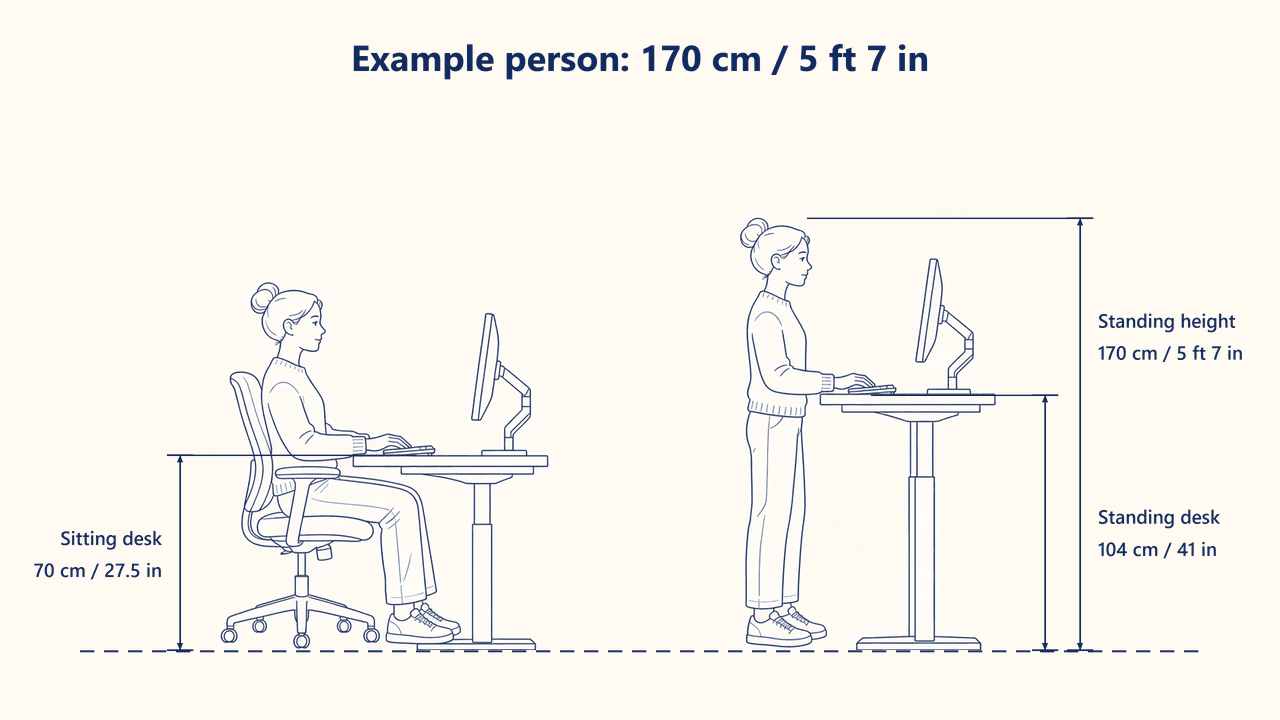
The correct standing desk height is not one universal number. It depends on your height, body proportions, footwear and even the type of work you do. However, there is one useful starting point: your desk should usually sit around elbow height when you are standing naturally, allowing your shoulders to stay relaxed and your wrists to remain in a neutral position.
For a faster personalised starting point, try the Joy Desk Standing Desk Height Calculator. Enter your height and work style to estimate both your sitting and standing desk heights.
What Is the Ideal Standing Desk Height?
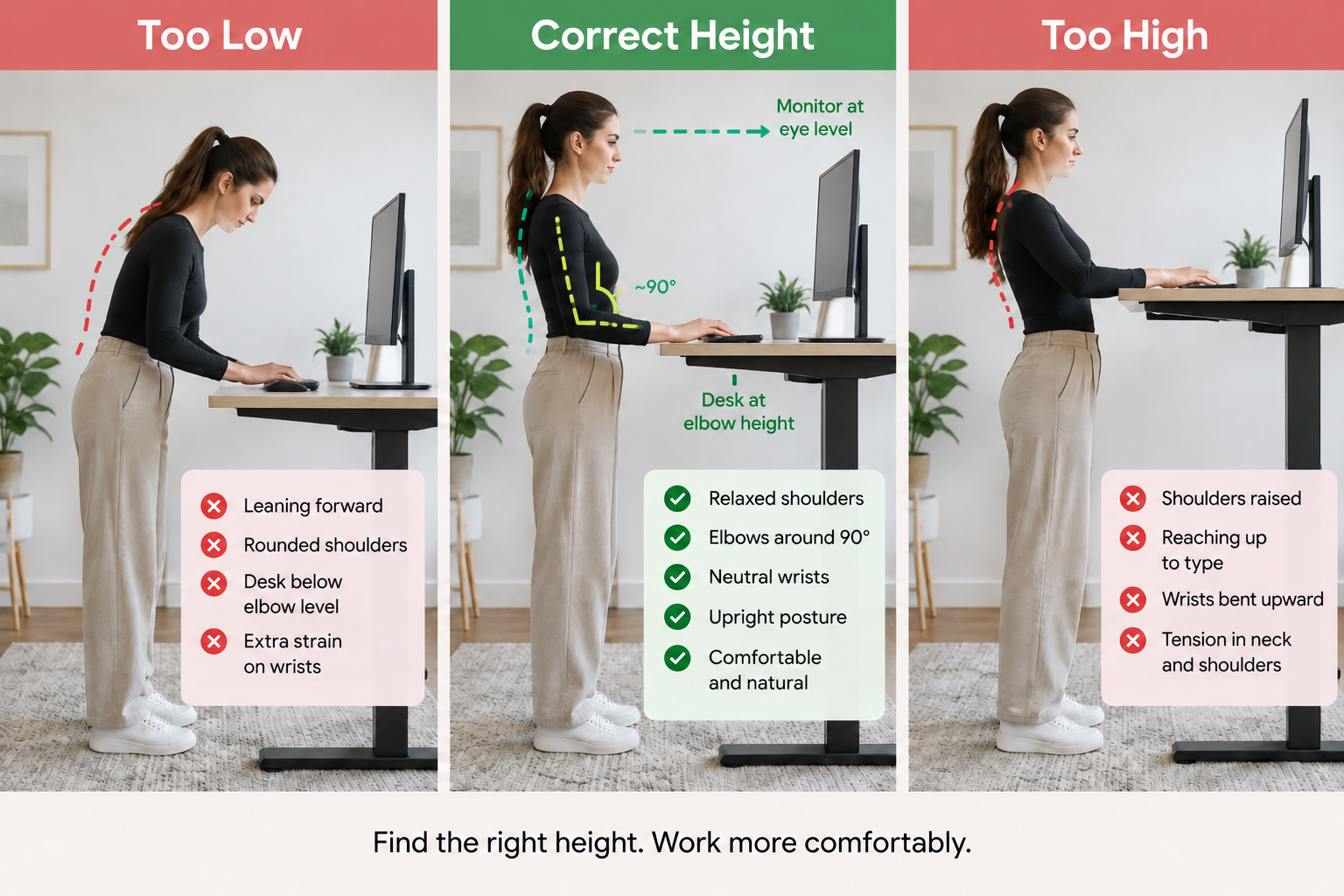
The ideal standing desk height is generally a position that allows you to work without lifting your shoulders, bending your wrists upwards or leaning forward toward your screen.
A simple way to find your starting position is:
- Stand naturally with your feet comfortably apart.
- Relax your shoulders.
- Bend your elbows to around 90 degrees.
- Raise or lower the desk until the desktop is approximately level with your elbows.
- Place your keyboard and mouse where your forearms can remain comfortable and your wrists stay relatively straight.
This follows common ergonomic workstation guidance. WorkSafe Queensland recommends positioning a sit-stand desk around elbow level when standing, while keeping the forearms supported.
The key point is that your height gives you a starting number, but your body position should confirm the final setting.
Two people who are both 175 cm tall may still prefer slightly different desk heights because arm length, torso proportions, footwear and working habits vary.
That is why small adjustments of 1–2 cm can make a noticeable difference.
Standing Desk Height Chart by User Height
If you want a quick estimate, the following standing desk height chart gives approximate starting heights for general office work.
| Your HeightApprox. Standing Desk Height | |
| 150 cm | 92 cm |
| 155 cm | 95 cm |
| 160 cm | 98 cm |
| 165 cm | 101 cm |
| 170 cm | 104 cm |
| 175 cm | 107 cm |
| 180 cm | 110 cm |
| 185 cm | 113 cm |
| 190 cm | 116 cm |
| 195 cm | 119 cm |
These figures should be treated as a starting point rather than a strict rule.
For example, at 170 cm tall, the Joy Desk calculator recommends a standing height of approximately 103.7 cm for general office work, with a comfort range around that starting point.
Want a more personalised result?
Instead of relying only on a chart, use our free Standing Desk Height Calculator.
It can help estimate:
- sitting desk height
- standing desk height
- chair seat height
- monitor eye line
- adjustments for different work styles
- an allowance if you normally wear shoes while standing
This is especially useful if you regularly switch between sitting and standing throughout the day.
How to Find the Correct Standing Desk Height
A calculator or standing desk height chart gets you close. Your posture tells you whether the setting is actually right.
1. Start at elbow height
Stand normally rather than deliberately straightening your back or raising your chest.
Your upper arms should remain close to your body and your shoulders should feel relaxed.
Raise the desk until your keyboard and mouse sit around elbow level.
2. Check your wrists
When typing, your wrists should remain as neutral and straight as possible rather than bending sharply upwards.
The Mayo Clinic recommends keeping the wrists and forearms in line, with the upper arms close to the body and the hands at or slightly below elbow level.
3. Check your shoulders
If you feel your shoulders lifting while typing, the desk may be slightly too high.
Lower it by approximately 1–2 cm and check again.
4. Check whether you are leaning forward
If you repeatedly lean down or forward toward the keyboard, your standing desk may be too low.
Raise it slightly and see whether you can work while remaining more upright and relaxed.
5. Fine-tune rather than chasing a perfect number
Ergonomics is not about finding one mathematically perfect desk height.
Use your calculated number as a starting point, then make small adjustments until the setup feels natural for your body and the work you are doing.
How Do I Know If My Standing Desk Is Too High?
A standing desk that is too high can make your upper body work harder than necessary.
Common signs include:
- your shoulders rise while typing
- your elbows move away from your sides
- your wrists bend upwards
- your upper arms feel tense
- you feel as though you are reaching up to use the keyboard or mouse
If this happens, try lowering the desk in small increments.
Your shoulders should be able to stay relaxed while your hands comfortably reach the keyboard and mouse.
How Do I Know If My Standing Desk Is Too Low?
A desk can also be uncomfortable when it is set too low.
You may notice that:
- you lean forward while working
- your shoulders round forward
- your head drops toward the screen
- your forearms angle noticeably downwards
- you put extra pressure through your wrists or hands
Try raising the desk slightly and reassessing your posture.
The aim is not to “stand perfectly straight” all day. It is to create a working position that does not force your body into an awkward posture.
Standing Desk Monitor Height: Where Should Your Screen Be?
Your desk height and monitor height solve two different ergonomic problems.
Your desk height helps position your keyboard and mouse comfortably.
Your monitor height helps control your head and neck position.
Do not raise your entire standing desk simply because your monitor feels too low. Doing this may place your keyboard too high.
Instead, adjust the monitor independently where possible.
For a typical workstation, position your main monitor directly in front of you, approximately an arm's length away, with the top of the screen around eye level or slightly below.
Both WorkSafe Queensland and the Mayo Clinic provide similar general workstation guidance for monitor positioning.
If your desk height feels correct but your monitor is still too low, a monitor arm or monitor riser can help you adjust the screen without changing your keyboard height.
Does Your Work Style Affect Standing Desk Height?
Yes. The ideal setting can vary slightly depending on what you spend most of your time doing.
General office work
For typing, emails, meetings and everyday computer tasks, start around elbow height and prioritise a comfortable neutral posture.
Keyboard-heavy work
If you spend most of the day coding, writing or typing, keyboard and wrist position become especially important.
You may prefer a slightly different setting that lets your hands remain relaxed for long periods.
Drawing and design
Designers may move between keyboard work, tablets, drawing and close visual tasks.
The most comfortable surface position may therefore differ slightly from a standard office setup.
Gaming
Gaming can involve prolonged keyboard and mouse use, so keeping the mouse close, shoulders relaxed and wrists comfortable becomes particularly important.
The Joy Desk calculator allows you to select different working styles so you can begin with a recommendation that better reflects how you actually use your desk.
Check Your Ideal Standing Desk Height
Not sure where to start?
Use the free Joy Desk Standing Desk Height Calculator to estimate your sitting and standing heights before setting up or choosing your desk.
Frequently Asked Questions
1. What height should a standing desk be?
A standing desk should generally begin around your standing elbow height. Your shoulders should remain relaxed, your forearms should feel comfortable and your wrists should stay relatively neutral while typing.
2. What standing desk height is suitable for someone who is 170 cm tall?
For a person around 170 cm tall, approximately 104 cm can be a useful starting point for general office work. Your preferred height may vary depending on your body proportions, footwear and work style.
3. What standing desk height is suitable for someone who is 180 cm tall?
For a person around 180 cm tall, approximately 110 cm can be a useful starting point. Fine-tune the desk after checking your elbow, shoulder and wrist position.
4. Should a standing desk be at elbow height?
For computer work, elbow height is a useful general starting point. OSHA's computer workstation guidance also recommends standing keyboard height at approximately elbow level.
5. Should my elbows be at exactly 90 degrees?
Around 90 degrees is a helpful visual guide rather than a number you need to measure precisely. Comfort, relaxed shoulders and neutral wrists matter more than forcing your arms into one exact angle.
6. How high should my monitor be at a standing desk?
For a typical computer workstation, the monitor should usually be directly in front of you, around an arm's length away, with the top of the screen around eye level or slightly below. Individual needs may vary.
7. How often should I switch between sitting and standing?
There is no need to stay in either position all day. Change positions regularly and include movement throughout your workday. If you are new to standing work, start gradually and adjust according to comfort.