Sitting
69.7 cm
27.4 in · 2′ 3″
Comfort band 67.2–72.2 cm
Free ergonomic tool
Enter your height in centimetres or feet and inches. We estimate the sitting and standing desktop heights that keep your elbows near 90° — then match that to the JoyDesk 62–127 cm travel.
Recommended for 170 cm / 5′ 7″
69.7 cm
27.4 in · 2′ 3″
Comfort band 67.2–72.2 cm
103.7 cm
40.8 in · 3′ 5″
Comfort band 101.2–106.2 cm
Both settings fit the JoyDesk 62–127 cm travel.
These figures are a starting point from standard adult proportions, not a medical assessment. If you have an existing injury, ask a physiotherapist or occupational therapist to check the setup.
The illustration uses a 170 cm / 5′ 7″ person as an example: sitting around 70 cm (27.5 in) and standing around 104 cm (41 in). Your numbers above replace those once you enter your height.
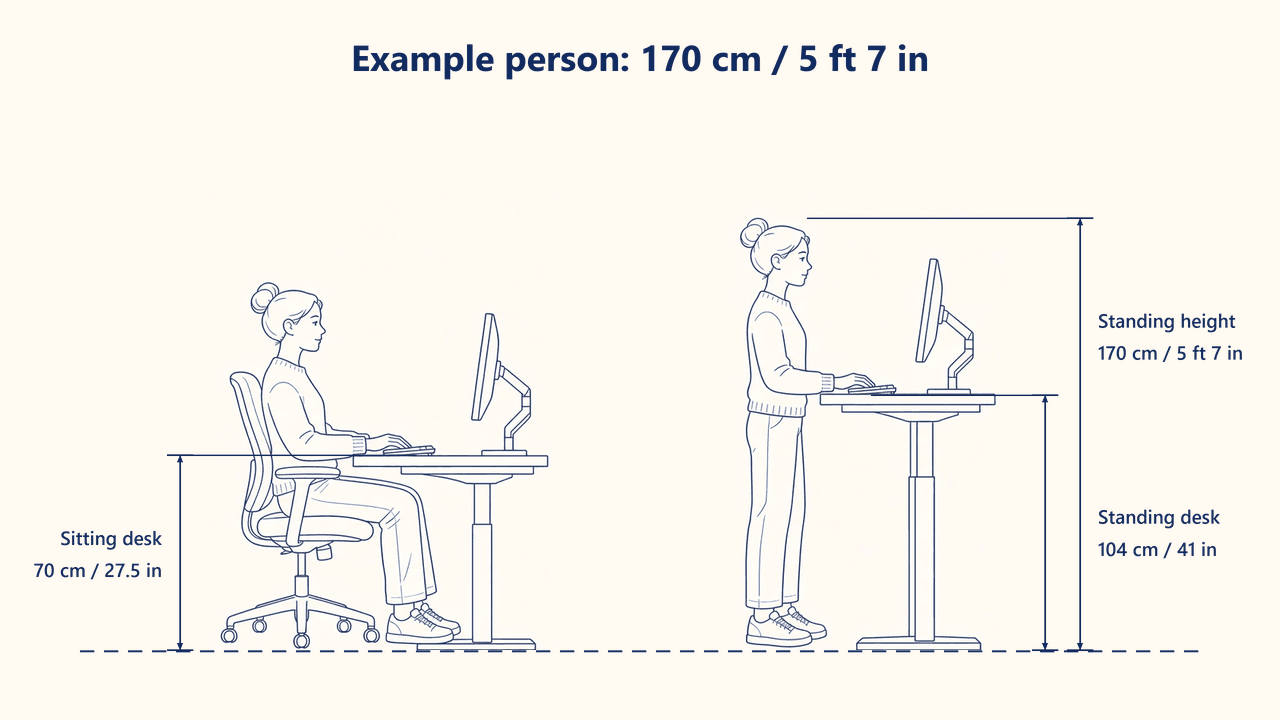
Stand against a wall without shoes, heels together, looking straight ahead. Mark the wall at the crown of your head and measure to the floor in centimetres. Convert to feet and inches if you prefer — the calculator keeps both in step.
Sit with feet flat, knees about 90°, and raise the desk until your elbows rest just above the desktop with forearms parallel to the floor. Wrists should stay straight on the keyboard, not cocked up.
Stand with soft knees and raise the desk to the standing number. Elbows stay near 90°. If shoulders creep up, drop the desk 1–2 cm. An anti-fatigue mat helps you stay standing longer.
The top of the screen should sit at or just below eye line in both postures. A monitor arm is worth it on a moving desk — the screen follows the surface instead of staying fixed to a sitting height.
Divide centimetres by 2.54 to get inches (70 cm is 27.6 in). Multiply inches by 2.54 to get centimetres. The calculator shows both, plus feet and inches for your height.
Measure without shoes so the sitting number stays honest. For standing at work, office shoes usually add about 2 cm — tick the shoes option or add that on the desk controller.
JoyDesk Standard travels 620–1270 mm and PRO 620–1250 mm. That covers typical adult sitting and standing heights in Australia, from shorter users (with a footrest if needed) through to people around 195 cm.
New users should start with 15–20 minutes standing each hour and build toward an even sit–stand split. The 20-8-2 pattern (20 minutes sitting, 8 standing, 2 moving) is a simple all-day rhythm. Standing all day is not the goal.
Usually yes. Drop the surface 1–2 cm so the elbows sit just above the desktop. Check that the keyboard is close to your body and the mouse is at the same height. Pain that lasts should be checked with a clinician — this tool is a starting point, not a diagnosis.
The same elbow rule applies. Children and users under about 150 cm often need a footrest at the sitting height, because 62 cm is as low as the frame goes. Users above about 195 cm should plan on a monitor arm so the screen reaches eye line at the top of the travel.
Loading reviews…